
 Changelog
  Get support
Authorization Flow
Basics of Authorization
Overview
We use OAuth2 to allow your application (CRM) to access our sites on the user's behalf. This required in order for each individual user to give consent to your 3rd party service.
The authorization server is responsible for issuing authorization codes and token that will be used to authorize the user in the target site. If you're not familiar with the OAuth2 protocol, check out this page for a step by step reference or Aaron Parecki’s “OAuth 2 Simplified” guide for a more comprehensive guide.
Marketplace ExampleFor the sake of example, we will be referring to Imovirtual as the site where users will authorize your application to access their accounts.To see currently available sites, visit our page about the supported sites.
Authorization flow
After storing the Client ID and the Client Secret that were provided to you in a safe place, it's time to authorize your application to manage user's adverts on the site.
The following image shows every step that is performed in the OAuth2 process:
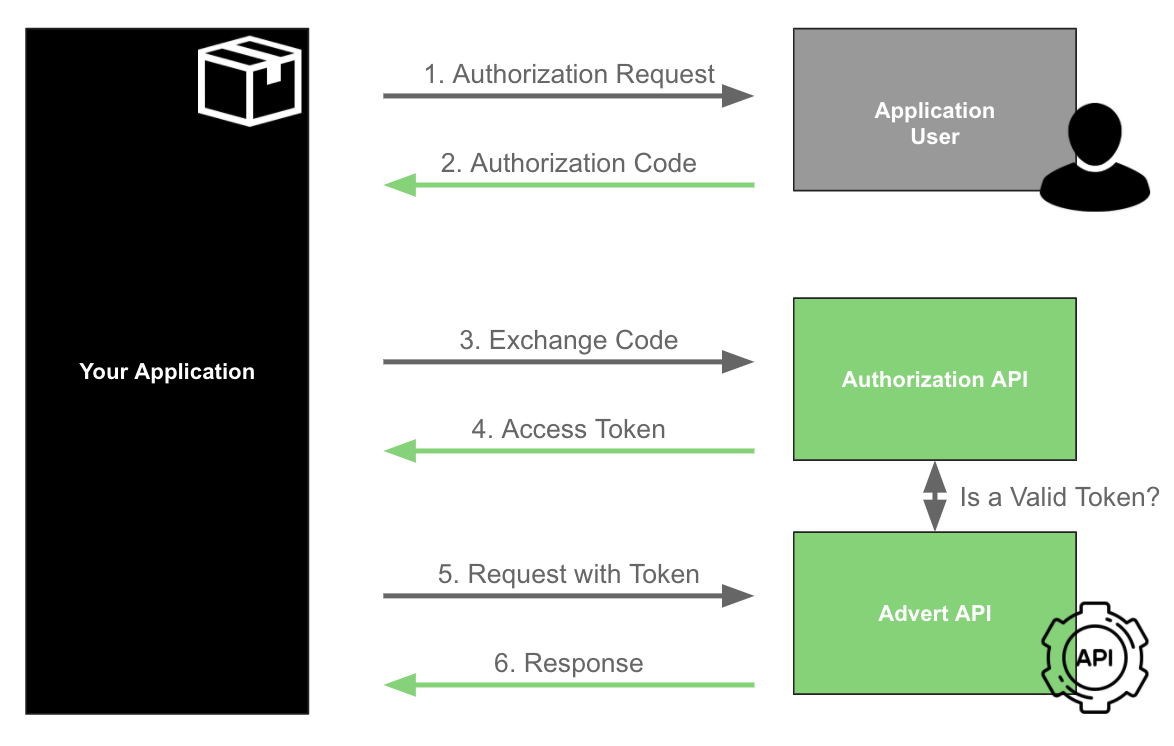
1. User authorizes your app
Each user must be authorized individually
The purpose of OAuth2 is to enable users to give your application consent to manage their adverts. Because of this, the process must be done for each user of the site.
The application user accesses the Application (your CRM), which redirects them to the site they want to use (such as storia.ro), so that they can first authenticate on the site and then authorize your application to access data on their account and/or execute actions on their behalf.
You should redirect users to this URL:
Note that you must include the following parameters in this URL:
| Parameter | Description | Value | Notes |
|---|---|---|---|
| OUR RE SITE | URL of the Portal you want to integrate with. | Check out the supported sites to see which ones are available. | Example: www.storia.ro |
| response_type | OAuth2 response type. | code is the only supported value. |
|
| YOUR CLIENT ID | Client ID that was provided to you as part of the application Details. | Application Client ID | Make sure that you configure the correct data for the different environments, in case you have an application for each environment. |
| USER ID | Defined as state. It refers to the application user internal identifier from your side, for example. This value will be passed back to you to prevent request tampering (more details below). | Random string | Without this value, you will not be able to automate the process to know the corresponding code for each application user is authorising the application. |
Redirect URI
The OAuth2 protocol also specifies that a redirect URI can be passed as a parameter . You don't need to do this because you already provided this URI when you registered your app (in the field Authorization Callback URI in the Application Manager. However, if you do pass it as a parameter, it will be validated against that one. If the base URIs don't match, your request will fail.
State parameter
The state field should be generated and validated by the Client Application. Its purpose is to help mitigate CSRF attacks. As explained in the OAuth 2.0 RFC, the state must use a non-guessable value and the user-agent's authenticated state (e.g., session cookie, HTML5 local storage).
The user has to provide the correct professional credentials to log in. After logging in, the Site (Storia, as an example) redirects users to a secure authorization page. On this page, users must grant your application permission to access the private information in their account. If they refuse to grant permission, then they are redirected back to your app.

User must authenticate into Storia

The user trusts the application to access his/her data.
After accepting that your application will authorize their account on the selected site, the user will be redirected back to your application (to the Authorization Callback URI specified in application manager) with an authorization code and the state previously sent in the request. For example:
		HTTP

302 Found
Location: https://yourawesomeapp.com/redirect/oauth?code=7faf9c72733ad3472963fdb3cb24b94e2f641a06&state=whateverStateYouHaveSentPreviously
Copied to clipboard
		JSON

{
    "transaction_id": "c793460c-f7bc-11e8-a049-4f7b3b284a42",
    "message": "The access token provided has expired"
}
Copied to clipboard
		cURL

curl --location --request POST 'https://api.olxgroup.com/oauth/v1/token' \
--header 'Accept: application/json' \
--header 'Content-Type: application/json' \
--header 'Authorization: Basic ' \
--header 'X-API-KEY: ' \
--header 'User-Agent: '
--data-raw '{
  "grant_type":"authorization_code",
  "code":""
}'
Copied to clipboard