
 Changelog
  Get support
Applying Promotions
Promotions or Value-Added-Services (VAS)
Promotions via API (VAS) allow you to programmatically create, manage, and track promotions for the listings you manage on our platform. With this integration, you can automate the promotion process, saving time and effort for your users.
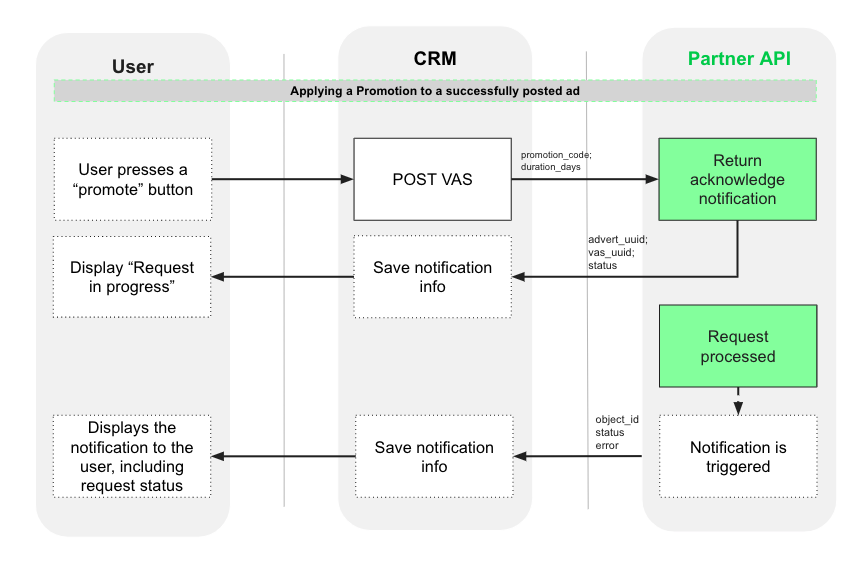
This technical documentation provides a comprehensive guide on promoting adverts via the Partner API. Promoting an advert increases its visibility and generates more leads. The promotions feature allows you to apply promotions to specific adverts managed by you on behalf of our mutual clients.
API Scopes
In order to use promotions via API, you will need to enable the new scopes write:vas and read:vas. Both should be present in your Application as the example below:
"scope": "read:adverts write:adverts read:leads write:vas read:vas"
Copied to clipboard
New Scopes
- Check your Application Manager to confirm if your application already has these scope available. If not, request help from the API team.
- If you want to enable this feature to already authorized clients, they will need to authorize the new scope, by performing the authorization of API integration again.
- You can check your clients’ refresh tokens to see if they already authorized the new scopes, and inform them if they didn’t.
Get Available Promotions
Endpoint: GET {{domain}}/taxonomy/v1/promotions/urn:site:<target>
This endpoint lets you retrieve the available promotions taxonomy for agencies and developers. It provides information about the promotions, including their codes, descriptions, duration, and applicable account types. Remember to filter by the correct marketplace target: storiaro or otodompl.
This is the first step to enable Promotions via API.
Request
		cURL

curl --location GET 'https://api.olxgroup.com/taxonomy/v1/promotions/urn:site:' \
--header 'Accept: application/json' \
--header 'Content-Type: application/json' \
--header 'X-API-KEY: ' \
--header 'User-Agent: '
Copied to clipboard
Response
		{
    "site": "urn:site:storiaro",
    "promotions": [
        {
            "promotion_code": "bump",
            "promotion_description": "Show your offer in the first place in the search results, for one raise.",
            "duration_days": [
                1
            ],
            "account_type": [
                "developer",
                "agency"
            ]
        },
        {
            "promotion_code": "homepage",
            "promotion_description": "This is an effective form of promotion for unique ads with beautiful photos, for x days.",
            "duration_days": [
                1,
                7,
                15
            ],
            "account_type": [
                "developer",
                "agency"
            ]
        },
      (...)
Copied to clipboard
Applying a Promotion
Endpoint: POST {{domain}}/vas/v1/advert/{{advert_uuid}}
This endpoint allows you to apply a promotion to a specific advert on our client's behalf. Use this endpoint when you have a valid API key and a valid authorization bearer.
Request
		cURL

curl --location POST 'https://api.olxgroup.com/vas/v1/advert/{{advert_uuid}}' \
--header 'Authorization: Bearer ' \
--header 'Accept: application/json' \
--header 'Content-Type: application/json' \
--header 'X-API-KEY: ' \
--header 'User-Agent: '
--data '{
    "promotion_code": "homepage",
    "duration_days": 1
}'
Copied to clipboard
You need to use following details to apply for a promotion:
| Field | Description |
|---|---|
promotion_code |
Code/name of the promotion. In the example, homepage. Check the "Get Available Promotions" section for more available promotions. |
duration_days |
Duration days represent the validity of the promotion. In this case, the advert will be displayed on the homepage for 1 day. Note: not all promotions require this field. |
Response/Acknowledge notification:
		Json

{
    "transaction_id": "{{transaction_id}}",
    "uuid": "{{advert_uuid}}", // deprecated, will be removed in the future in favor of the data.advert_uuid field
    "message": "Data is valid",
    "data": {
        "advert_uuid": "{{advert_uuid}}",
        "vas_uuid": "{{vas_uuid}}",
        "status": "requested"
    }
}
Copied to clipboard
| Field | Description |
|---|---|
| transaction_id | Transaction id uniquely identifies this request. |
| uuid | Deprecated field. Same as advert_uuid for backwards compatibility purposes. |
| advert_uuid | Advert id to which you applied the promotion. |
| vas_uuid | Promotion unique id. Used to track the end-to-end process more accurately. |
| status | Request status: requested means that the promotion is in process. At this stage, approved requests will have this status. Read more about the existing Promotion Status. |
From this message, save the transaction_id, advert_uuid, vas_uuid, and request status, to track VAS requests.
From this message, save the transaction_id, advert_uuid, vas_uuid, and request status, to track VAS requests.
Great, you're almost there! Prepare the webhook to handle VAS notifications to check if the request succeeded. This means that later you will receive on your Webhook URL the webhook notification that informs you if the promotion was successfully applied or not. Please refer to Value-Added-Services webhook page.
Get all Active Promotions for an Ad
Endpoint: GET {{domain}}/vas/v1/advert/{{advert_uuid}}
This endpoint allows you to retrieve the active promotions for a specific advert. It provides information about the active promotions and their expiration dates.
Request
		cURL

curl --location GET 'https://api.olxgroup.com/vas/v1/advert/{{advert_uuid}}' \
--header 'Authorization: Bearer ' \
--header 'Accept: application/json' \
--header 'Content-Type: application/json' \
--header 'X-API-KEY: ' \
--header 'User-Agent: '
--data ''
Copied to clipboard
Response:
Response example when the advert has only one applied VAS.
		Json

{
    "transaction_id": "{{transaction_id}}",
    "message": "Data is valid",
    "data": {
        "uuid": "{{uuid}}",
        "vas": [
            {
                "uuid": "{{vas_uuid}}",
                "advert_uuid": "{{advert_uuid}}",
                "promotion_code": "bump",
                "status": "applied",
                "error": {},
                "custom_fields": {
                  "field": "value"
                },
                "created_at": "2023-06-27T08:43:53.266Z",
                "updated_at": "2023-06-27T08:44:26.857Z"
            }
        ]
    }
}
Copied to clipboard
| Field | Description |
|---|---|
transaction_id |
Transaction id uniquely identifies this request. |
advert_uuid |
Advert id to which you applied the promotion. |
vas_uuid |
Promotion unique id. Used to track the end-to-end process more accurately. |
status |
Promotion status. Read more about the existing Promotion Status. |
error |
Error description if promotion is not successfully applied. The error is empty when the promotion was successfully applied. |
custom_fields |
Additional fields related to the VAS. Might include fields such as olx_url for the URL of the advert on OLX (for olx VAS only). Read more the existing Custom Fields. |
promotion_code |
Promotion code used on the initial request. |
duration |
Promotion duration used on the initial request. |