
 Changelog
  Get support
Receiving Advert Notifications
Learn how to use webhooks to accelerate the feedback loop
Overview
Publishing, editing, or deleting adverts are asynchronous operations, which means that your command is not immediately executed. When you publish an ad from your application, our platform will process it and deliver a response directly to the callback URL that you defined when you registered your app).
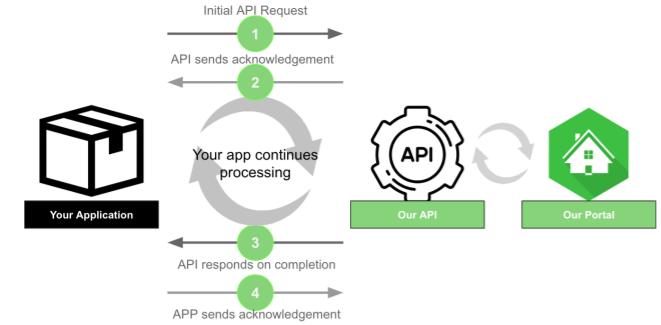
Asynchronous API
Here's an example of a notification you'd receive after you publish an ad:
		JSON

{
  "destination": "https://myawesomeapp.com/webhooks",
  "timestamp": 1572969379247,
  "event_timestamp": 1572969379671,
  "transaction_id": "b315c893-b42c-417a-9ecd-f060cb44cf13",
  "object_id": "4f5ee709-28d7-4b68-8716-dd912157919f",
  "flow": "publish_advert",
  "data": {
    "activated_at": "2019-11-05T15:56:19.000+0000",
    "recorded_at": "2019-11-05T15:56:19.247+0000",
    "code": "active",
    "moderation": {
      "reason": null,
      "description": null
    },
    "created_at": "2019-11-05T15:56:10.000+0000",
    "visible_in_profile": true,
    "modified_at": "2019-11-05T15:56:19.000+0000",
    "ttl": "2019-11-18T17:44:04.000+0000",
    "url": "AD_ID"
  },
  "event_type": "advert_posted_success"
}
Copied to clipboard
The field flow tells you what event flow this event belongs to. In this case, it's a publish_advert because you just published an ad. The event_type field gives you more details about the specific event the message refers to. This example tells you that your ad was successfully published (advert_posted_success).
For instance, when the event is a success, the data contains the following information:
| Field | Description |
|---|---|
| code | The advert status code. Check Advert status codes for the list of possible codes. |
| ttl | The estimated time to live of the advert. |
| url | The URL where the advert may be seen. |
| created_at | The creation date of the advert on the target site. |
| activated_at | The activation date of the advert on the target site, if the advert was made available. |
| visible_in_profile | States whether the advert is visible in the user's profile: true or not: false |
On the other hand, when the event is a failure type, the data contains the following information:
| Field | Description |
|---|---|
| title | The summary message of the failure |
| detail | The detail message of the failure |
| validation | The optional list of validation errors that caused the failure |
Check out the most Common errors you can receive.
Getting the advert metadata
In case you don't receive the notification or you need to fetch it for some reason, you can do it by calling the following endpoint:
		HTTP

https://api.olxgroup.com/advert/v1//meta
Copied to clipboard